Search results for: “help”

  • “Hades” by Supergiant Games

    “Hades” by Supergiant Games

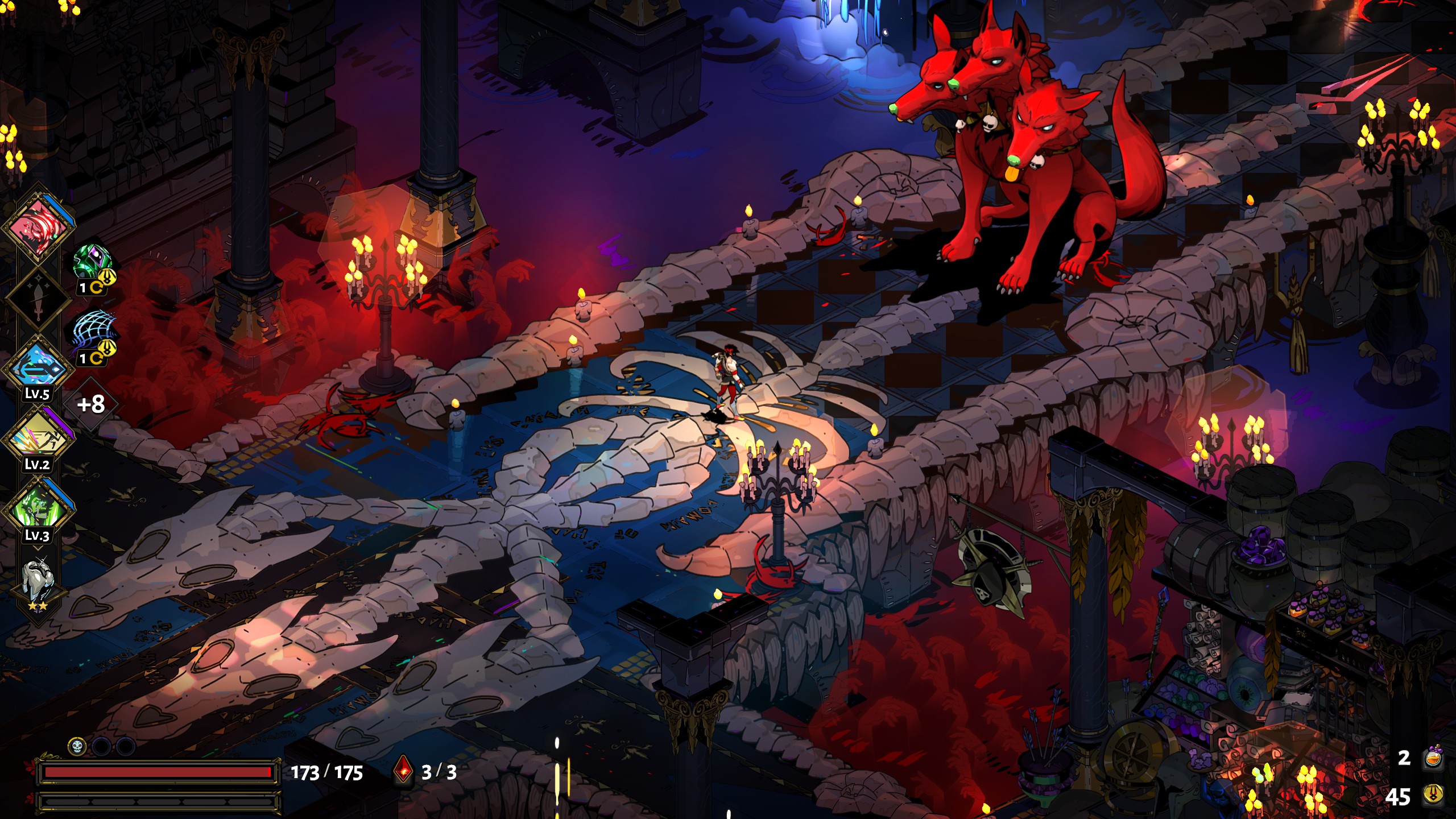
    I haven’t played many games in the last years, but darn it, “Hades” deserves all the praise. Once again Supergiant Games originality and brilliance shines, from the trailer art style you might remember their past games like Bastion and Transistor.

    So whats great about Hades? Most RPG loot-grind games quickly get boring after you have beaten the final boss, but in Hades the superb story telling, based on Greek mythology, makes you engaged and wanting to continue grinding to discover whats next in the each plot line. Its nice to recall the ancient history lessons.

    And surprisingly, the story is huge! I’ve played almost 70 hours, and there is a lot still to be grinded. I liked how different the play styles are according to the weapon you chose, and yet how challenging becomes because your booms (the powers given by Olympian Gods to help you escape from the Underworld) are randomly given.

    I’m favorite character is obviously Cerberus, how no to love the three headed boy.

    If you haven’t played Hades, you’re definitely missing out. Worth it the full price (25 USD).

    PS: I’m super fan of their soundtracks, super recommended to watch/listen their Orchestral show.

  • Coronavirus (COVID-19): will we get through?

    This week died the first person in Guatemala due to Coronavirus (covid-19). At least the initial measures the country has taken were good, to mention a few:

    • Banning foreigners, from countries with severe infections, to enter the country.
    • Sports and entertainment events are cancelled.
    • Schools are suspended.
    • Holy Week events are also suspended, also religious congregations (in person) aren’t allowed.
    • Public transportation was suspended in the whole country.
    • Most of the government activities are suspended. Private sector also should suspend activities, unless its food or cleaning related.
    • Other business could continue if they comply with the new health code related to this pandemic and they provide transportation aid to their employees.
    • In social media people are also urging others to stay at home, do remote working, and avoid contact whenever possible.
    • Also should be noted that the government has been doing a great job transmitting the measures taken. Not everything have been received well, but this is way better than the previous president. Its even calling out people to not fall for disinformation via social media.

    But would that be enough? Will the people stay home or avoid contact as much as possible?

    • Guatemala is a poor country, most of the labor force doesn’t have any savings, so they are forced to “live by the day”, that’s it to earn nay money to buy food for the same day. Its unrealistic that these people will stay at home.
    • In the country, business owners are know to not comply with many of the labor laws; as the government is very slow with the labor inspections. So asking their employees to come to work (or be fired if they don’t) in the middle of pandemic crisis and while the public transportation is suspended, is not even surprising:
    • Those of us who can stay at home, we’re very privileged. The rest of the labor force will continue to risk being exposed to the virus, as long as there is not a clear ban to non-essential activities.
    • Whats worried some is that after 48 hours without new cases, the government is starting to downplay the severity of this disease. I believe we are way early to say such things.

    We can only hope that it gets contained somehow, and for the world powers to develop cheap treatments or vaccines.

    No doubt this is going to be a hard year, very likely the recession is upon us. This pandemic will be remembered by many.

    To watch:

    Vox published a few videos that are very informative about the COVID-19 disease:

    Pictures:

  • Ugh, Google is buying Fitbit

    https://a.com.gt/log/imgs/2011/02/IMG_0660-950×535.jpg
    My first bit device, back in 2011

    Pretty sure you already had heard the news of Google buying Fitbit for about 2 billion dollars, and I, as a customer, don’t like it.

    Since the very first devices, I had liked Fitbit’s discreteness. Surely their devices weren’t oriented for professionals, like Garmin’s, but small enough to carry them on daily basis, the battery last about three weeks, and they sync whenever you are close to a PC (or your phone). I’m not a sporty nor outdoor type of people, so Fitbit is a great for tracking my overall walking activity without having to carry my phone all the time.

    Some people are worried about their data, to which Fitbit responded:

    The company never sells personal information, and Fitbit health and wellness data will not be used for Google ads.

    Of course, you don’t need to sell the data, or use it for ads, to profit from it: “IBM didn’t inform people when it used their Flickr photos for facial recognition training“. But fine, I feel my data on Fitbit’s servers is that important.

    My gripe about Google buying Fitbit, is that the later would become a worse service. You see, Google is pretty inconsistent with their product strategies, for a corporation of their size that has been unable to sort out their messaging apps for so long, the future doesn’t look good for Fitbit. And Google’s customer support is terrible bad:

    The lesson I learned a long time ago is Google products are great until you need to contact someone. I’m sure a few people have some ability to directly contact a real person at the company, but 99% of us are stuck with their product support forums that OP linked to, which frankly are terrible and rarely solve any real problems

    ddtaylor comment on Hacker News: G Suite Horror Story

    What I can see happening is:

    • Google will shove WearOS into new Fitbit-based hardware offerings.
    • All current Fitbit accounts will be migrated to Google’s, which would lead to existing features stop working and having to deal with “legacy accounts“.
    • Rebrand it a couple times, because why not.
    • If Google can’t make a significant bent on Apple’s wearables market share, they might decide to focus on something else, making Fitbit join the “Killed by Google” club.

    Man, I’m sad about this. Just a few weeks ago, I was telling a few coworkers how nice Fitbit works. So much for trying to stir away from some of Google’s mess.

  • A year of reading books

    A year of reading books

    Back in December 2017, I wanted to read a lot more books. I’m not a person that starts a new year making a list of goals, but this was the first time I’ve being serious about achieving something through the year.

    My goal was to read more than 25 books, maybe even reach the 50 books in year; I tried hard a few months, but I end up at 32 books. It feels great, I got to read a lot of stories and really good books.

    • Reading this many books, made me feel like the year lasted longer. As if I had experienced in person all those stories, and visited the places told in the books.
    • Going through 25 books in a year feels doable as long as you stay focused on the goal (around 2 weeks to read a book). Achieving 50 or more books, that’s going to be hard if you have a busy life (work and other hobbies are going to interfere), or stick to picking light books (cheating 😉 )
    • I don’t really mind reading on printed books or ebooks. Some have good edition, others don’t. Each one has its pros and cons, I just wanted to consume the story.
    • One thing about reading printed books, is that the covers are attractive, so people might ask you about your read (more if they see you reading periodically at the same place). With tablets or ebook readers, people might think you are just checking Social Media.
    • It really helped me carrying a book everywhere, even to a bar. Reading while commuting a third world country is fine, while pulling a ebook reader could be dangerous.
    • Its funny because the more I read, the more books get into my wish list. I got a lot of follow ups from Scientific books. Still feels good to tackle a bound of entries from my list.

    You can checkout the books I had have read at LibraryThing.

    I’m going to keep with this goal through 2019, maybe should I call it an habit by now 🙂 Feels good to be able to read books, I should try to read even more.

  • Spam en las listas de correo de Ubuntu.com

    Por cosas del destino termine siendo administrador de una lista de correo en Ubuntu.com (y eso que Ubuntu ya no me interesa), la de ubuntu-gt para ser preciso, lo que nunca me dijeron es que iba a recibir ofertas de viagra, descuentos en viajes y títulos MBA ¬¬

    Y es que los spammers mandan a todas las direcciones y listas que encuentran en su camino, por ejemplo:

    From: “EuroPrimeCasino” <oeuoocpehco[arroba]weather.com>
    To: <hardy-changes[arroba]lists.ubuntu.com>, <ubuntu-us-ny[arroba]lists.ubuntu.com>,
    <ubuntu-ch-owner[arroba]lists.ubuntu.com>, <ubuntu-au[arroba]lists.ubuntu.com>,
    <ubuntu-pl-request[arroba]lists.ubuntu.com>, <upstart-devel[arroba]lists.ubuntu.com>,
    <ubuntu-l10n-am[arroba]lists.ubuntu.com>, <ubuntu-bo[arroba]lists.ubuntu.com>,
    <ubuntu-it[arroba]lists.ubuntu.com>, <ubuntu-l10n-gl-request[arroba]lists.ubuntu.com>,
    <edubuntu-devel-request[arroba]lists.ubuntu.com>,
    <ubuntu-us-tx-dallas[arroba]lists.ubuntu.com>, <ubuntu-us-ok[arroba]lists.ubuntu.com>,
    <ubuntu-gt-owner[arroba]lists.ubuntu.com>, <ubuntu-bo-owner[arroba]lists.ubuntu.com>,
    <list[arroba]lists.ubuntu.com>, <bughelper-owner[arroba]lists.ubuntu.com>,
    <ubuntu-cu[arroba]lists.ubuntu.com>

    La salida más rápida sería bloquear todo lo que llegue vía ubuntu-gt-owner[arroba]lists.ubuntu.com o incluso dejar una dirección de correo inexistente como admin de mailman, por no es ese el chiste.

    ¿Alguien de casualidad conoce alguna configuración de mailman que ayude a parar a los spammers? ¿que no haga forward de lo que llega a las cuentas *-owner? He revisado en el panel y lo único que veo es batallar con expresiones regulares. También comparé con algunas listas (ya sin actividad) de SourceForge de las que quede de admin y no veo nada raro. Solo se me ocurre que en SourceForge tenga algun filtro que los admins de Ubuntu.com no ¬¬

    ¿Ideas?

  • Twitter conoce el spam

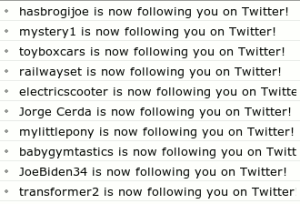
    Pues parece que los spammers ya están haciendo de las suyas en twitter, en los ultimos días he recibido bastantes notificaciones de que tengo nuevos seguidores en twitter:

    notificaciones de twitter

    Todos con nombres de letras y números, muchos amigos y muy pocos seguidores; algunos son insistentes y te agregan varias veces con tal que hagas lo mismo. Lo bueno es que twitter te permite bloquearlos para que dejen de molestarte. Realmente me parece que a twitter le va haciendo falta una forma sencilla para reportar estos spammers, de momento está el formulario de ayuda pero parece que no da resultados.

    Me parece que están usando la API de Twitter para agregar amigos a estos usuarios, es realmente fácil, solo se necesita tener un listado de usuarios y aferrarse al límite de 70 peticiones por hora.

    Almenos lo bueno es que el numero de mis seguidores sigue aumentando 😉

    Etiquetas: , , , ,

  • Bloqueando publicidad desde el archivo hosts

    Cuando Internet era joven y el número de dominios muy reducido, la resolución de nombres se hacía por medio del archivo HOSTS en el cual se listan las direcciones IPs y sus correspondientes nombres de dominio.

    Con el enorme crecimiento de Internet y la introducción de los servicios DNS, el propósito original del archivo HOSTS fue impractico quedando como una reliquia, que aún hoy los Sistemas Operativos soportan. Cuando se hace una petición por un nombre de dominio, la mayoría de SOs actuales revisan primero si existe una entrada en el archivo HOSTS, de no estar revisan en su caché de DNSs y si tampoco está allí, proceden a mandar una petición a su servidor DNS.

    El que el archivo HOSTS tenga la más alta prioridad, nos permite definir nuestras propias entradas por sobre lo que nuestro DNS diga. Si queremos agregar nuestra propia entrada al archivo HOSTS, basta con agregar una linea como está al mismo:

    255.255.255.255       nombre.de.dominio

    ¿Y en dónde se encuentra el tan famoso archivo HOSTS? Varía según el Sistema Operativo, en Windows XP y 2000 se encuenta en C:\WINDOWS\system32\drivers\etc mientras que en Mac y Linux lo encuentras en /etc/hosts.

    Es precisamente esta técnica la que yo he usado desde hace algún tiempo para «bloquear» algunos sitios que no me son útiles y solo roban tiempo de carga a las páginas que visito. En mi caso estoy bloqueando algunos los servicios de publicidad y estadísticas más populares; mi archivo hosts termina luciendo así:

    127.0.0.1	www.google-analytics.com
    127.0.0.1	pagead2.googlesyndication.com #adsense
    127.0.0.1	ad.doubleclick.net
    127.0.0.1	rcm.amazon.com # publicidad de amazon
    127.0.0.1	a.tribalfusion.com
    127.0.0.1	botones.blogalaxia.com
    127.0.0.1	s23.sitemeter.com
    127.0.0.1	www.statcounter.com

    Es recomendable usar 127.0.0.1 por motivos de velocidad. Usar este truco tiene sus ventajas frente a otras soluciones de bloqueo o filtro:

    • El archivo HOSTS tiene la más alta prioridad, las entradas allí definidas serán resueltas al «instante»
    • Es independiente del navegador, e incluso no tendrás que instalar ninguna extensión como AdBlock para Firefox
    • Rápido y sencillo, con una linea estarás bloqueando un dominio entero sin sacrificar ciclos de CPU

    Y también sus desventajas:

    • Primitivo, no tendrás heurística para bloquear nuevos sistemas de publicidad ni posibilidad de aplicar excepciones bajo ciertas condiciones.
    • Para bloquear un nuevo sistema de publicidad deberás investigar que dominios usan e irlos agregando a tu archivo, algo que pude complicarse si usan muchos subdominios

    Usar el archivo HOSTS para bloquear sitios indeseables no es nada nuevo, incluso el sitio Most Valuable Professional mantienen un archivo HOSTS de 604 kb con miles de entradas de sitios maliciosos; y mantienen un blog relacionado donde publican algunos datos interesantes. A mi me parece un poco pesado dicho archivo de MVP pero como es actualizado continuamente luce una buena solución para mantener libre de pestes.

    Es curioso, cuando bloqueas tantos sitios de publicidad y empiezas a ver muchos espacios vacíos en los sitios, te das cuenta de que tan «contaminado» está Internet hoy en día.

  • Thank you DrMike

    Llevaba mucho tiempo sin visitar los Foros en Inglés de javieraroche.com/, hoy que doy una vuelta por allá me encuentro con algo muy triste: DrMike uno de los moderadores voluntarios de los foros, fue despedido perdiendo sus privilegios como moderador; la razón: cuestionar las políticas de Automattic.

    Entiendo que que todo su trabajo fue voluntario y que nunca se le obligo ha hacerlo. Su enorme trabajo ha de sido de gran ayuda para muchos bloggers en javieraroche.com/, participando en más de 7,000 hilos es mucho más de lo que cualquiera pueda lograr. Incluso juntando todas las respuestas del Equipo de javieraroche.com/ no podrían igualarse a esa cantidad…. pero parece que ellos no les importo para nada toda esa cantidad y calidad.

    Y justo ahora que yo también soy moderador de los foros en español esto me deja con un WTF!?! en la cabeza. Igual que DrMike, soy moderador voluntario y no recibo pago alguno por ello más que el agradecimiento de los bloggers, que es suficiente para mí. Pero la actitud del Equipo de javieraroche.com/ fue inapropiada, echar a quien evita que debas pagarle a alguien que lidea con la gente, y nada más que por el gusto de hacerlo. Eso pasa cuando dejas de ser ayuda y te conviertes en el problema….

    DrMike: So long and thank you for all your help in the forums. You are the Man 😉 The javieraroche.com/ forums will not be the same with out you.

    BTW: Empiezo a creer que es tiempo de tener un plan B en caso de que javieraroche.com/ Sucks.

    Otros bloggers que hablaron del tema:

  • Avant Window Navigator

    Avant Window Navigator es una barra tipo dock que se instala en la parte baja de la pantalla y te permite intercambiar entre las ventanas que tengas abiertas:

    Avant Window Navigator

    Es muy similar a la que incluyen los sistemas Mac OS, pero esta es una implementación libre de la misma idea. Para usarla necesitas tener instalado o beryl o compiz para que funcionen las transparencias y demás efectos.

    Es bastante personalizable: puedes cambiar los colores o bien usar una imagen de fondo, eliges usar esquinas redondeadas o cuadradas, agregar accesos directos a aplicaciones (siempre aparecen a la izquierda), ver todas la ventanas abiertas o solo las que tengas en el escritorio actual. Lo único que no se puede modificar es el tamaño de los iconos (por ahora).

    ¿Quieres tenerla en tu escritorio? Hay 2 formas de hacerlo, desde los repositorios (solo Edgy 32-bit):

    1. Agregas:
      /etc/apt/sources.list

      deb http://download.tuxfamily.org/syzygy42 edgy avant-window-navigator
      deb-src http://download.tuxfamily.org/syzygy42 edgy avant-window-navigator
    2. Luego ejecutas:
      wget http://download.tuxfamily.org/syzygy42/8434D43A.gpg
      sudo apt-key add 8434D43A.gpg
      rm 8434D43A.gpg
      sudo apt-get update
    3. Por último instalas avant-window-navigator-svn

    O desde los fuentes en el SVN (como yo lo he hecho):

    1. Instalas las dependencias:
      sudo apt-get install build-essential autotools-dev libgnome2-common libgnome2-dev libgnome-desktop-dev libgnome-vfs-dev libgtk2.0-dev libwnck-dev libgconf2-dev libglib2.0-dev libgnomevfs2-0 libgnome-desktop-2 libgnome2-0 libwnck-common python-gtk2 python-gconf subversion
    2. Obtienes ls fuentes del SVN:
      svn checkout http://avant-window-navigator.googlecode.com/svn/trunk/ avant-window-navigator
    3. Compilas y listo:
      cd avant-window-navigator
      ./autogen.sh
      make
      sudo make install

    En este punto ya tiene que haber un nuevo elemento en tu menú, lo ejecutas y obtienes algo como esto:

    [youtube=http://www.youtube.com/watch?v=lHt5wSFsBjM]

    Si quieres que AWN se auto oculte, debes ejecutar gconf-editor e ir a /apps/avant-window/navigator, luego modificas la llave auto_hide a verdadero (cheque puesto).

    Aún esta en desarrollo pero funciona bastante bien. Yo solo tuve el problema que aveces minimizas una ventana y luego no regresa ni a patadas… hay que cerrarla y comenzar de nuevo. Igual que a la Dock de Mac OS, a AWN se le puede criticar:

    1. No hay forma de cambiar el tamaño.
    2. Los iconos idénticos lucen idénticos. Si por alguna razón 2 aplicaciones tienen el mismo icono no sabes cual es cual, hasta llevar el mouse encima de una de ellas.
    3. Los objetos necesitan colores. Si tienes 2 ventanas de Firefox o varias ventanas de Gimp no hay diferencia notable.
    4. No se puede cambiar de posición ni ponerla en vertical. La famosa kiba-dock ya hace esto desde hace mucho.

    Afortunadamente tienen buenas ideas por hacer, aunque con forme avance AWN habrá que estar pendientes para no llegar a problemas como este (una solución drástica sería usar el plugin AddHelper de Beryl).

    Referencia: HOWTO: functional eye-candy with Avant-Window-Navigator and Affinity

    Etiquetas: , gnu/linux, ubuntu, , , , ,

  • Como Beryl te puede ayudar a ser más productivo

    ¿No te ha pasado que en ocasiones quieres concentrarte en una solo aplicación, la inspiración no viene y te distraes viendo los iconos del escritorio? Entre los nuevos agregados de Beryl esta el plugin AddHelper, cuya función es oscurecer todo excepto la ventana activa de tu escritorio:

    [youtube=http://www.youtube.com/watch?v=iRa3BM-m8ik]

    A mí ya me ha servido un par de veces 😉 Puedes configurar los niveles de transparencia y opacidad, así como la combinación de teclas para activarlo.

    Etiquetas: , ,